The app
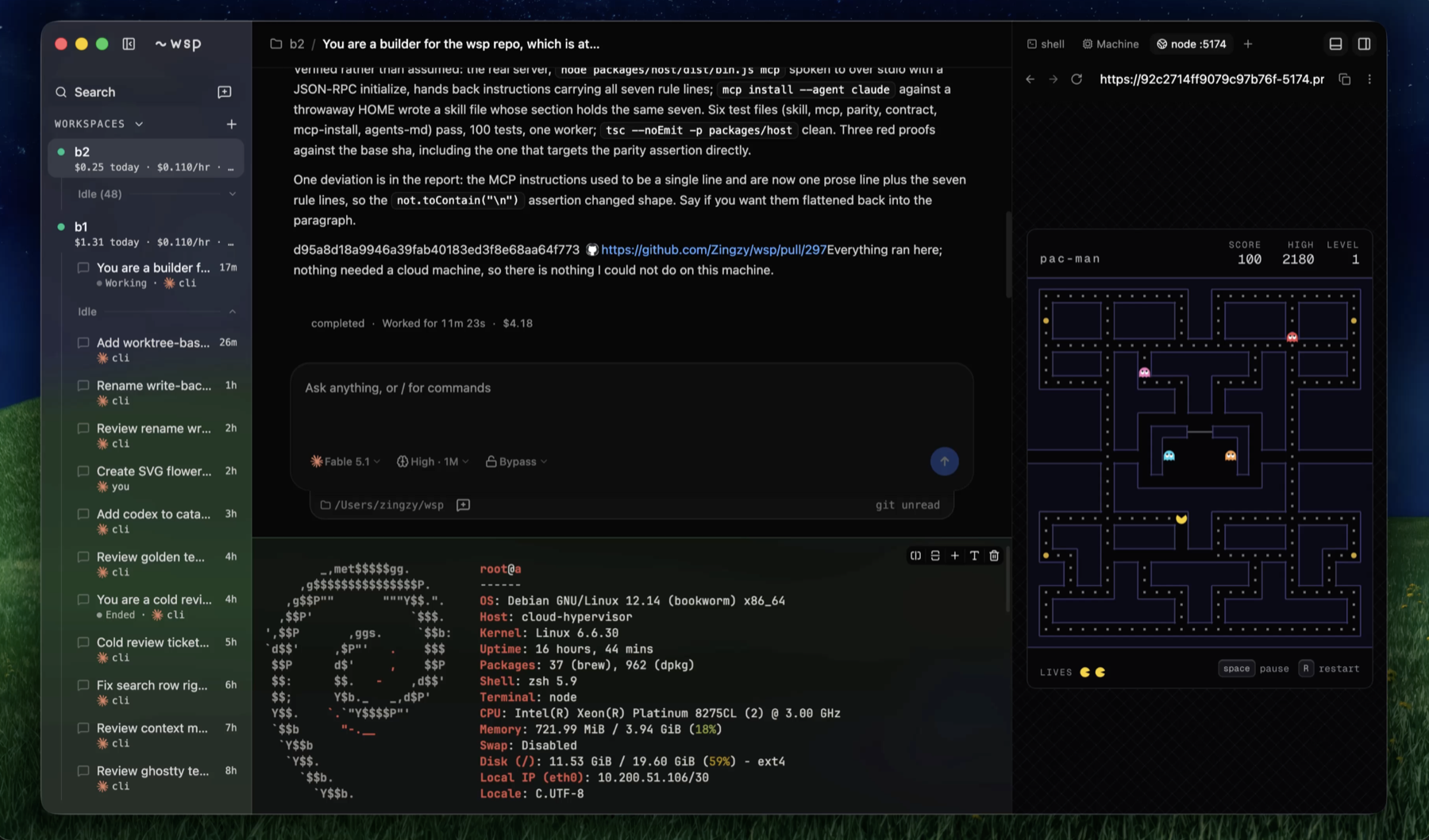
wsp up serves the app at http://127.0.0.1:4400; the desktop app is that same host in a window, with an Electron process on top of it. Three regions: workspaces and their threads on the left, the open thread in the middle, and the machine on the right.
The sidebar
Each workspace is a row of two lines: a state dot and the name, then a mono line with what it cost today, its rate, and its nap countdown, $0.42 today · $0.083/hr · naps in 12m. The dot is green only while the machine runs; paused shows a hollow circle, and pausing or waking pulse. A gone or zombie machine shows its recovery actions on the row itself. Double-click the name to rename it.
Threads sit under their workspace, split into a working list and an Idle shelf. Each row is the title, its age, then the status word, the agent's mark and who opened it: you, cli or agent. Sort is static: activity never reorders the list, so a row holds its place between transitions and the screen moves only when a thread enters or leaves the working list.
The Search row opens the command palette. A Forwarded ports section lists the ports the host forwards to this computer: a printed link is a link you can click here, a sign-in callback is a plain label, because a bare request into an OAuth listener would end the flow.
The thread
A running turn reads Working for 12s. When the machine cannot run it, that line says what it waits for: waiting for the machine to wake, with a Wake button, waking the machine, waiting for the machine to answer, or the machine is gone. Replies render as markdown with syntax highlighting, copy buttons, and file links that open in the right panel. A plan the agent proposes renders as its own card, and a turn's changed files as a tree with a link into the Diff surface. When a turn settles, one line sits under it: completed · Worked for 1m 4s · $0.0231.
The composer
Ask anything, or / for commands. Enter sends, Shift-Enter is a newline, / at the start opens the agent's own slash commands, read off its binary on that machine. There are no attachments.
A running turn blocks nothing. Enter queues the message; queued rows stack above the box and the first starts the next turn when the current one ends. A send-now arrow on a row joins the running turn where the agent takes input mid-turn, Claude Code, or stops the turn first where it does not, Codex, and says so. Drafts and queues survive a reload.
Three pickers sit under the box, each built from what that agent's CLI accepts: the model, the effort with its context window, and the access mode. Picks persist per workspace and apply at the next turn. Once a thread has a turn, its agent is pinned; picking another says to start a new thread. Under them, a strip names the folder the thread works in and the branch the machine reports, read and never switched.
The right panel
A tab strip of surfaces, one showing at a time, each with a letter shortcut from the panel's empty state.
| surface | key | what it is |
|---|---|---|
| Browser | B | a port on the machine, framed as a page |
| Terminal | T | a shell on the machine |
| Files | F | the machine's files, read only |
| Diff | D | git changes in the project |
| Machine | M | state, reach, size, live samples, usage, lineage |
| Processes | P | what runs on the machine, inspect and kill |
| Screen | S | the machine's display, when it has one |
Terminal
The terminal is the official Ghostty terminal core compiled to WebAssembly, not an emulator on top of one, and bytes flow from the machine to the pane without a React re-render per chunk. It reads your own Ghostty config from this computer, with Ghostty's lookup order and the theme resolved for the dark scheme: font family, colours, the palette, cursor style and blink, padding, background opacity. The font size is the app's text size until you zoom; mod+= and mod+- zoom the pane alone, never the window, remembered per workspace. A font button lets you name another installed font; prompt glyphs a face lacks come from a bundled symbols font.
A shell survives a nap, because the machine is frozen rather than rebuilt; only a replaced machine loses it, and the pane says so. mod+d splits, up to four per group.
Machine
State, reach, size, awake time and auto-nap. Live cpu, memory and disk as sparklines over the last two minutes at the helper's two-second interval. Usage as a line chart of the accrued total, in the spend colour, with rate now, accrued today, and the snapshot storage line: 4 snapshots · 12.3 GB · about $0.61/month above the free 10 GB from Solari. Lineage lists the golden's versions with what each is missing, and holds Update, Roll back, Rebuild, Pause or Wake, and Upgrade to another size where the provider allows it.
Processes
One dense table, pid, cpu, mem and command, sortable and filterable, with a tree indent and the agent's own processes named. Selecting a row opens its user, state, start, threads, cwd, ports and children. Kill is two presses within two seconds and no dialog; kill -9 appears only once TERM has done nothing for five seconds.
Browser
Any port the machine listens on, framed through the route the runtime mints for it, with back, forward, refresh, an address bar that elides the token, and "Open in system browser". The white-page problem is handled: a cross-origin frame tells the page nothing, so the pane asks the host what one fetch of the route answered and names the exact fix. Vite's Blocked request names server.allowedHosts and notes the machine's environment already sets it, so a restart is usually the whole fix. Invalid Host header names webpack's flag with the host filled in. A Rails body gets its config.hosts line. Next.js's Unauthorized names allowedDevOrigins.
Files and Diff
Files is a tree rooted where the thread works, with a pin to stop following it. Picking a file opens it as a tab beside the tree, read only, since the helper has no write op. Diff runs git diff in the project with a scope picker, working tree, staged, or the branch against its merge base, a changed-files tree, and split or unified views.
Palette and shortcuts
mod+k opens the command palette: actions, workspaces and recent threads, with thread titles searched live. Every action that exists in a menu exists here with the same words, and a refused action shows its refusal as the row's description. mod is Command on macOS and Control elsewhere.
| chord | does |
|---|---|
mod+k |
command palette |
mod+b |
toggle the sidebar |
mod+alt+b |
toggle the right panel |
mod+j |
toggle the terminal drawer under the thread |
mod+shift+o, mod+n |
new thread |
mod+d, mod+n |
split, new terminal, with a terminal focused |
mod+=, mod+-, mod+0 |
terminal zoom in, out, reset |
ctrl+tab, ctrl+shift+tab |
next and previous workspace, with a hold-to-switch overlay |
mod+1 to mod+9 |
jump to a sidebar slot |
A focused terminal owns Control chords, which the shell reads; on macOS Command chords fire wherever focus is.
Banners
Two banners can sit above the thread. When the runtime socket drops, wsp is not running, reconnecting. and the page picks the host up on its own when it returns. When a tool on a machine asks for a browser, A sign-in page for github.com is ready on dev, with Open and Dismiss; the full URL, which carries the flow's state, shows on hover only.
The desktop app
The same host and page in one window: one macOS disk image carrying both Apple silicon and Intel, and Linux as an AppImage, from the two buttons on the site or the releases page. Dragged out of the disk image it lands in Applications; opened from anywhere else it offers to move itself there and restarts, which is what keeps the wsp command it writes pointing at a path that lasts. The bundles are unsigned. It adds what a browser tab cannot have: a native folder picker for imports, native context menus, the computer's installed fonts for the terminal, and page previews in the workspace switcher. Links open in your default browser. If a host is already serving it attaches; otherwise it starts one and owns it. With no golden yet it shows one line, run wsp init in a terminal, and a retry button; onboarding never happens in the window.
There is no in-app theme toggle; the app ships dark. There is no auto-updater; a new version is a new bundle from the releases page.